

Creating explainer videos for free is possible. You don’t need expensive tools.
Explainer videos help explain ideas clearly. They are short and engaging. These videos can boost your message. Many think creating them costs a lot. But that’s not true. With the right tools, you can make them for free. This guide will show you how.
We’ll explore the best free tools available. You’ll learn to create videos that look professional. By the end, you’ll be ready to make your own explainer videos without spending a dime. Let’s get started!
Benefits Of Explainer Videos
Explainer videos are powerful tools for businesses and individuals. They present information in a simple and engaging way. These videos help audiences understand complex topics quickly. Let’s explore some key benefits of explainer videos.
Boost Engagement
Explainer videos are known to boost engagement. People prefer watching videos over reading text. Videos grab attention and keep viewers interested. This leads to higher interaction rates. Engaging content is crucial for retaining audience interest.
Consider adding explainer videos to your content strategy. They can significantly improve user engagement. This will encourage viewers to spend more time on your site.
Simplify Complex Ideas
Explainer videos simplify complex ideas. They break down complicated topics into easy-to-understand visuals. This helps audiences grasp difficult concepts quickly. Visual aids like animations and graphics make learning enjoyable.
When dealing with technical subjects, explainer videos are invaluable. They can present information in a clear, concise manner. This makes it easier for viewers to remember and understand the content.
Choosing The Right Tools
Creating explainer videos for free can be a fun and rewarding experience. The first step is to choose the right tools. The right tools will make the process easier and more enjoyable. Let’s explore some free software options and user-friendly platforms.
Free Software Options
There are many free software options available for creating explainer videos. Here are a few popular choices:
- Blender: This is a powerful open-source tool. It is great for 3D animation and editing.
- OpenShot: This is a simple and easy-to-use video editor. It is perfect for beginners.
- Shotcut: This is a free, open-source, cross-platform video editor. It supports many video formats.
These tools offer a wide range of features. You can use them to create engaging explainer videos without spending a dime.
User-friendly Platforms
Using a user-friendly platform can save you time and effort. Here are some platforms that are easy to use:
- Canva: Canva offers a drag-and-drop interface. It is very intuitive and perfect for beginners.
- Powtoon: This platform allows you to create animated videos. It offers many templates and is easy to navigate.
- Biteable: Biteable is another great option. It offers a range of templates and a simple interface.
These platforms are designed to make video creation simple. They are perfect for those with little or no experience in video editing.
Planning Your Video
Creating an explainer video can seem daunting, but planning makes it easier. A well-thought-out plan helps ensure your video communicates its message clearly. Here are some steps to help you plan your explainer video effectively.
Define Your Goal
The first step in planning your video is to define your goal. Ask yourself what you want to achieve with the video. Do you want to explain a new product? Are you trying to teach a new concept?
Having a clear goal helps guide the rest of the planning process. It ensures every part of the video aligns with your main objective.
Explain a product: Show features and benefits
Teach a concept: Provide step-by-step instructions
Create A Storyboard
Once you have a goal, the next step is to create a storyboard. A storyboard is a visual plan of your video. It outlines the scenes and the flow of the video.
- Sketch each scene
- Include notes on actions and dialogues
- Keep it simple and clear
A storyboard helps you visualize the video and make changes before starting production. It also makes it easier to communicate your vision to others involved in the project.
Scripting Your Content
Creating an explainer video can be a fun and creative process. Before you dive into animations, you need a solid script. This script will guide your video and ensure your message is clear and engaging. Let’s explore how to write an effective script.
Keep It Concise
Viewers have short attention spans. You need to grab their interest quickly. Aim to keep your script under two minutes. Break down your message into key points. Use short sentences and get straight to the point. Avoid unnecessary details that can overwhelm the audience.
- Identify the main problem
- Present your solution
- Highlight benefits
Use Simple Language
Your audience might not be familiar with complex terms. Use simple language that anyone can understand. Avoid jargon and technical terms. Speak directly to your audience. Imagine you are explaining your idea to a friend.
Example: Instead of saying “Utilize,” say “Use.” Instead of “Facilitate,” say “Help.”
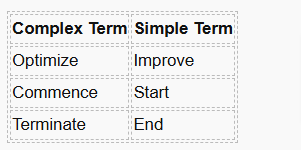
Using simple language makes your content accessible to a wider audience. It ensures everyone can follow along and understand your message.
Designing Visual Elements
 Creating explainer videos for free is a great way to communicate your message. A crucial step in the process is Designing Visual Elements. Good visuals can capture attention and make your video memorable. Here, we will discuss two key aspects: using graphics and animations, and maintaining brand consistency.
Use Graphics And Animations
Graphics and animations bring life to your explainer video. Use simple and clear graphics to illustrate your points. Animations can make complex ideas easier to understand. Consider tools like Canva or Powtoon for creating free graphics and animations.
- Choose colors that contrast well.
- Use icons to represent ideas.
- Animate text to highlight key points.
Animated elements should support the story. Do not overuse them. Excessive animations can distract viewers from your message.
Maintain Brand Consistency
Brand consistency helps to build trust and recognition. Use your brand’s color palette and fonts. Ensure that your logo appears in the video.
- Use the same color schemes.
- Stick to your brand’s font.
- Include your logo in the corner.
Consistency in visual elements makes your video look professional. It also ensures your audience can easily identify your brand. This is vital for building a strong brand identity.
Here is an example of how to maintain brand consistency:
Primary Color: #FF5733
Secondary Color: #C70039
Font: Arial
Logo: Brand Logo
Follow these tips to design visual elements effectively for your explainer video. This will help you create engaging and professional-looking content without spending a dime.
Recording Voiceovers
 Recording voiceovers is a crucial step in creating effective explainer videos. A good voiceover can clarify your message and engage your audience. This section will guide you through selecting a clear voice and ensuring good audio quality.
Select A Clear Voice
Choosing the right voice is important. It should be clear and easy to understand. Here are some tips for selecting a clear voice:
- Neutral Accent: Choose a voice with a neutral accent. This helps all listeners understand.
- Pacing: The speaker should talk at a moderate speed. Not too fast, not too slow.
- Tone: The tone should match the video’s mood. Friendly, professional, or serious depending on your content.
- Consistency: Ensure the voice remains consistent throughout the video. This keeps the audience engaged.
Ensure Good Audio Quality
Good audio quality makes your video sound professional. Follow these tips for clear and crisp audio:
- Quiet Environment: Record in a quiet place. Avoid background noise.
- Quality Microphone: Use a good microphone. Even budget microphones can offer great quality.
- Pop Filter: Use a pop filter to reduce harsh sounds. This makes the voice clearer.
- Audio Editing Software: Use free software like Audacity. Edit out any background noise and enhance the voice quality.
By focusing on these two aspects, your voiceovers will sound clear and professional. This will make your explainer videos more engaging and effective.
Editing The Video
Editing the video is a crucial step in creating an engaging explainer video. This process can enhance the overall quality and ensure your message is clear. You don’t need expensive software to edit your video effectively. Let’s explore some essential editing techniques.
Trim Unnecessary Parts
First, remove any unnecessary parts from your video. This keeps the content concise and engaging.
- Identify segments that do not add value.
- Use free editing tools like OpenShot or Shotcut.
- Keep your video under two minutes for better engagement.
Shorter videos hold attention better. Make each second count.
Add Background Music
Background music can make your video more engaging. It can set the tone and keep viewers interested.
- Choose royalty-free music from sites like Free Music Archive or Bensound.
- Match the music to the video’s mood.
- Ensure the music volume does not overpower the narration.
Music should enhance the video. It should not distract from the message.
Publishing And Sharing
Publishing and sharing your explainer video is the final step. It’s crucial to ensure your video reaches your audience. This section will guide you through choosing the right platform and promoting on social media.
Choose The Right Platform
Choosing the right platform is essential. YouTube is a popular choice for many. It has a large audience and is easy to use. Vimeo is another good option. It offers high-quality video hosting. Consider your audience. Where do they spend most of their time? Post your video there.
Make sure your video title is clear. Use keywords related to your topic. Write a detailed description. Include links to your website or social media. Add tags to help people find your video. Optimize your video for search engines. This will increase your chances of being found.
Promote On Social Media
Promoting on social media can help you reach a wider audience. Share your video on Facebook. Create a post with a catchy headline. Add a brief description. Include a link to your video.
Twitter is another great platform. Tweet a short message with your video link. Use relevant keywords. This helps people find your tweet.
LinkedIn is good for professional audiences. Share your video in relevant groups. Write a short message about your video. Include the link.
Instagram allows video posts. Share a clip of your video. Add a link in your bio. Use engaging visuals to attract viewers.
Engage with your audience. Reply to comments and messages. This builds a connection and encourages sharing.
Creating free explainer videos is now within your reach. Use accessible tools and resources available online. Keep your scripts short and engaging. Focus on clear visuals and simple language. Practice makes perfect, so experiment and learn as you go. Share your videos widely to reach more people.
With these tips, you can produce effective explainer videos without spending a dime. Start your video creation journey today!
Leave a Reply